Registration
Everything you need to get your wrestler signed up and on the mat.
Set Up Your Wrestler
Once you are signed up with the club, there are a few outside websites and apps to set up. None of them are run by us, and the process can be confusing the first time. Here is exactly what each one is for and how to get through it.
AAU Card
Required to step on the mat at all — practice included, not just tournaments. Start here — you need the card number for everything below.
Stack Team App
Our team communication hub — practice times, cancellations, event details, and where dues are paid. Free.
Trackwrestling
Where you actually sign your wrestler up for tournaments, and where brackets and results live. Free.
FloWrestling — Optional
A paid streaming service for watching matches live. Nice to have, never required.
One rule that saves everyone headaches: on every site below, the parent creates the account, and the wrestler is added underneath it as a profile. Do not sign up as your child. Use the same spelling of your wrestler's legal name everywhere — these systems do not know that “Jesse” and “Bubba” are the same kid, and mismatched names are the number one reason a membership fails to verify at the scale table.
AAU Card
Do this one first. An AAU athlete membership is required to practice with us and to compete — it is the insurance that covers your wrestler on the mat, so it is not optional and it is not just a tournament thing. On the competition side it covers every event we wrestle: opens, developmental, Beginner State, Top 100, Region, and State. You will be asked for the card number when you register for the club and again for every tournament, so get it out of the way before anything else.
How to Buy One
- 1 Use AAU Club code URQDPFR4D. Enter it during checkout. See the Club Code box for why this matters.
- 2 Go to aau.uventex.com and sign up. Use the parent's real name — it becomes the digital signature on the membership.
- 3 Click Add new athlete, choose My Child, and fill in every field. Incomplete profiles silently do not show up at the next step, which looks like a broken website but is not.
- 4 Go to Memberships → AAU Athlete Memberships → Get started, then work through the four steps: add your athletes, select the membership, sign, and pay. Enter the club code when it asks.
- 5 Save the card to your phone before you close the tab. See the box to the right — you will need this number constantly, and digging it out at a weigh-in table is miserable.
Use Our Club Code — Not Your Own
All Tennessee clubs register under the Team TN umbrella for insurance. If you create your own club code, or buy with no code at all, your wrestler is not covered and may not be eligible for Region and State.
Do not reuse a code from a previous season or copy one off another club's website — several local sites still show codes that expired years ago. AAU issues a new code each September, so check with us before you buy or renew.
Buy It On or After September 1
The AAU membership year runs September 1 through August 31. A card bought in July expires a few weeks later on August 31 — it will not cover the winter season. Buy for the upcoming season, not the one that is ending, or you will pay twice.
Which Membership Level?
There are two: Regular and Extended Coverage (AB). Regular is all you need — it covers every AAU event including nationals. Extended Coverage only adds accident insurance for non-AAU events, like school practices. Expect somewhere in the neighborhood of $22 to $25; check the price at checkout, since AAU updates it each season.
Keep It on Your Phone
Do this the moment you finish paying. Gyms have bad signal and you will not want to be logging into AAU at a weigh-in table.
- Screenshot the card as soon as it appears, then favourite the screenshot so it does not get buried.
- Or add it to your wallet. If AAU offers an Add to Wallet or Save to Phone button on the card, use it — Apple Wallet and Google Wallet both keep it one swipe away, no signal needed.
- On an iPhone you can also open the screenshot, long-press the membership number, and copy it straight into a registration form.
- Do it for each wrestler if you have more than one — the numbers are different, and mixing them up means registering the wrong kid.
Lost the Card Number?
Log back into aau.uventex.com and open your athlete's membership, or use AAU's membership lookup with your wrestler's first name, last name, date of birth, and zip code. It will show the membership number and the club it is attached to — a good way to confirm the club code actually took.
Ignore the Old Signup Link
AAU moved to a new membership system, and a lot of wrestling websites — including some official ones — still link to the old play.aausports.org address, which no longer works. If you land on a dead page or an old-looking form, you are in the wrong place. Start over at aau.uventex.com.
Coaches and Volunteers
Thinking about helping out? Talk to the head coach first — do not buy anything until you have. If you do come on board, every adult needs their own non-athlete membership and must pass a background screening. A parent cannot buy it for you, and the screening is included in the fee. Budget about two weeks, longer during the September rush.
The Card Is Not the Only Step
A perfect AAU card does not by itself make a wrestler eligible for the postseason. These are the things that catch first-year families out.
The Roster Deadline
Your wrestler has to be on the club's league-approved roster by mid-January. Miss it and they can wrestle open tournaments all winter and still be shut out of Region and State. We handle this — but tell us early if your wrestler is joining mid-season.
How You Reach State
Only your Region tournament qualifies you, and you have to place in the top four of your weight class. Opens, Beginner State, and Top 100 are great experience but they are not qualifiers. We are in Region 3, and a wrestler may only enter one region tournament.
No Weight Cutting
There is one weigh-in, one attempt, and no check scales. Weights are not rounded, so 35.1 lbs goes up a class, with a one pound singlet allowance. Coming in heavy just bumps your wrestler up at no charge. Cutting weight is not part of youth wrestling here and will get a wrestler disqualified.
Stack Team App
Stack Team App is how the club talks to families. Practice schedules, last-minute cancellations, tournament details, and team announcements all go out through it. If you are not on the app, you will miss things.
It is completely free for members, and one login can hold every team your family is part of. Club dues are paid through the app as well, so you will need it either way.
How to Join
- 1 Download Stack Team App from the App Store or Google Play. The publisher is Team Mates Pty Ltd.
- 2 Tap Log In or Sign Up and create your account with your email and a password. Create the account before you search for the club — searching first is the most common mistake and it locks you out of our files.
- 3 Check your inbox and click the verification link. If it is not there in a few minutes, look in spam and mark it Not Spam. Work and school email addresses often block it — a personal Gmail or Outlook address is safer.
- 4 Use the search icon and look up Rockvale Wrestling Club. Tap the club, then Request to Become a Member.
- 5 Pick the access groups that apply to you — parent, wrestler, and so on — then send the request. This step matters: if you skip it you get approved but see almost nothing.
- 6 Wait for a club admin to approve you. Until then the app will look empty — that is normal, not a bug.
- 7 Once you're approved, submit your wrestler's uniform sizes — jacket/hoodie and warm-up pants — in the app. This is how the club places the gear order, so don't skip it.

Turn Notifications On
There are three separate switches, and all three have to be on or you will miss alerts:
- Your phone's permission for the app — iPhone: Settings → Notifications → Stack Team App. Android: App Info → Notifications.
- Inside the app: More → Settings → Notifications → Push Notifications on.
- Each chat room separately — open the room, use the menu, enable notifications. These are independent of the main setting.
No Smartphone?
You can do everything from a computer at Rockvale Wrestling Club on Team App — news, events, documents, and schedules all work in a browser. Create the account first, then search for the club.
Two Different “Codes”
Stack Team App sometimes emails you a login code to sign in. That is not a club code and it has nothing to do with joining us — it is just their version of a one-time password. You can only request one every 30 minutes, so do not keep tapping resend.
Uniform Sizes
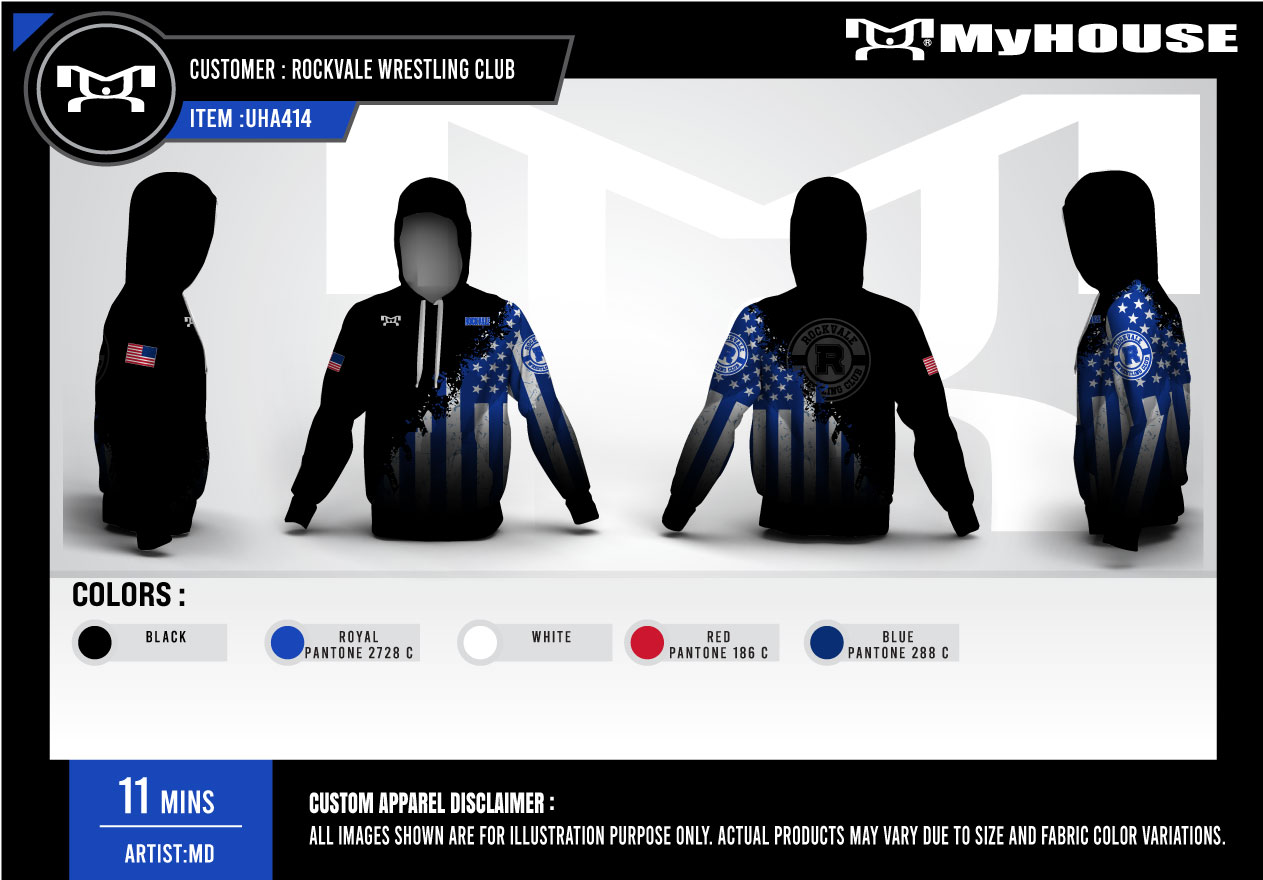
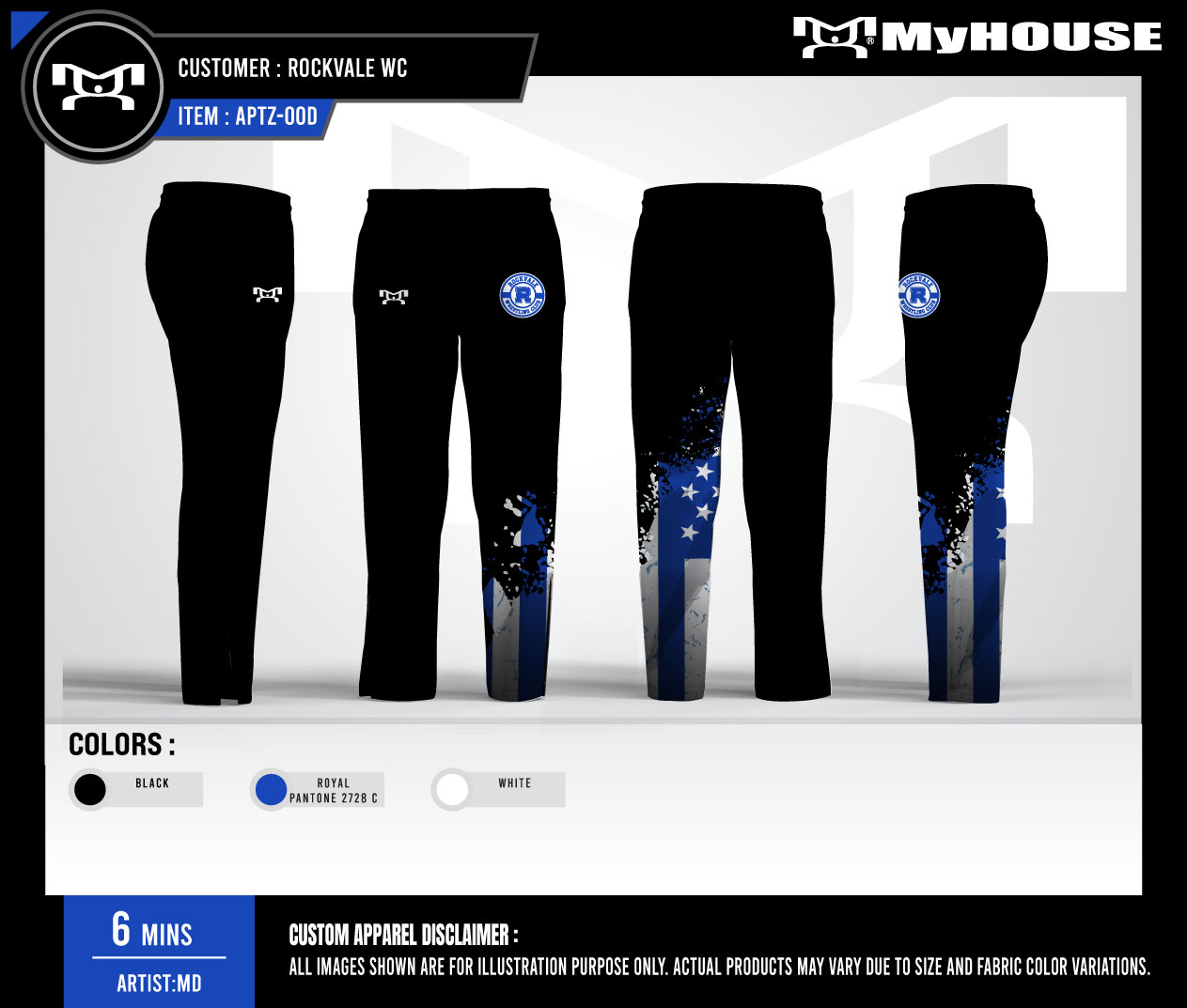
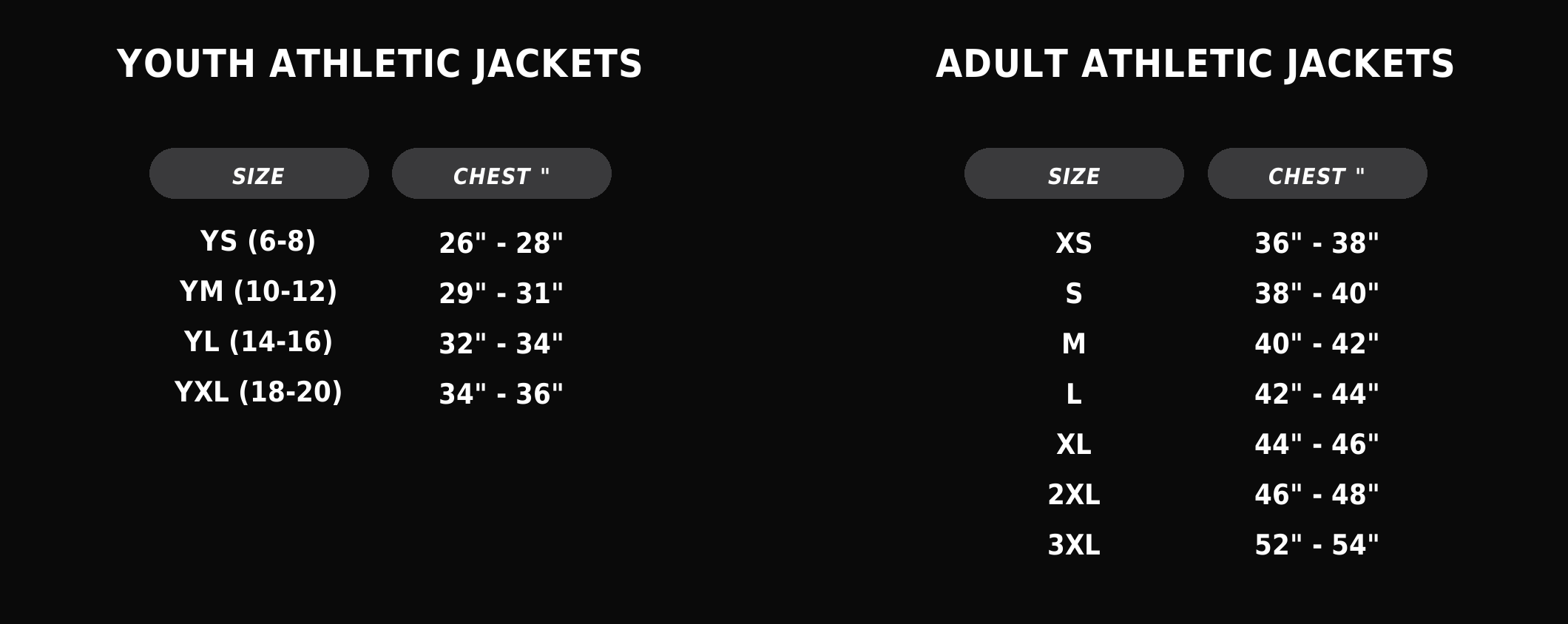
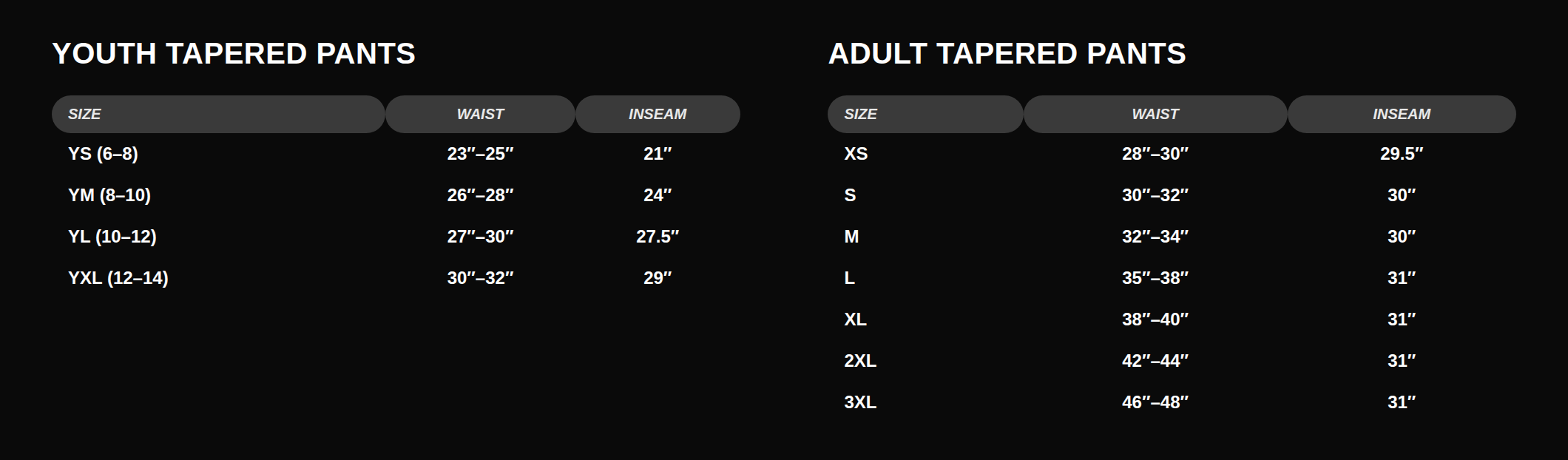
When you register in Stack Team App, you'll also pick sizes for your wrestler's warm-up jacket/hoodie and pants — this is how the club places the team gear order.
- Youth (chest 26"-36"): YS, YM, YL, YXL
- Adult (chest 36"-54"): XS, S, M, L, XL, 2XL, 3XL
- Enter one size for the jacket and one for the pants — they're ordered separately. When in doubt on a growing wrestler, size up.
Trackwrestling
Trackwrestling is where you enter your wrestler in tournaments, and where brackets, mat assignments, and results show up on tournament day. Creating an account is free. You only pay the entry fee for each event, which the host sets.
Create Your Account
- 1 Go to trackwrestling.com/login and use the Create Account side.
- 2 Enter your email and a password, then your name, birth date, and city. Use the parent's information here — you have to confirm you are 18 or older to finish.
- 3 Once you are in, go to Manage → Profiles → Create Profile and add each wrestler. They will show up under Managed Profiles. Double-check the birth date — a wrong year means the right division will not even appear at registration.
Enter a Tournament
- 1 Use the direct link the club posts in Stack Team App whenever there is one. That is always the safest route — it drops you on the correct event.
- 2 Otherwise go to trackwrestling.com/registration and use Quick Search — search by the event name, a date range, and Tennessee.
- 3 Sign in rather than continuing as a guest. Guest registrations are not saved to any account — you get an invoice number instead, and if you lose it you cannot view or fix your entry.
- 4 Fill in your wrestler's details and pay the entry fee. You will be asked for a valid AAU card number — that is the one from Step 2. Every host sets up their own form, so the other questions change from event to event.
You Do Not Have to Pay to Follow Along
Brackets, mat assignments, team scores, and results are all free to view on Trackwrestling. A subscription only adds live video and instant alerts — you can absolutely follow your wrestler all day without spending a dime.
Duplicate Profiles
It is easy to end up with the same kid in the system twice, which splits their match history. Trackwrestling fixes this — submit their merge request form through support.trackwrestling.com with the profile number you want to keep and the duplicates. It usually takes about a day.
Deadlines Are Hard Deadlines
Tournaments close registration at a set time and many cap the number of entries. Once it says closed or full, that is it, and entry fees are usually non-refundable. Register early rather than the night before.
Not Every Event Uses Trackwrestling
Our AAU tournaments all run through Trackwrestling, but the occasional outside event uses a different system that looks very similar. Always follow the specific link the host or the club posts rather than assuming it is Trackwrestling.
FloWrestling
FloWrestling is a paid streaming service. It is worth it if you want to watch events live when you cannot be there, rewatch matches, or get real-time alerts when your wrestler is up. It is never required to compete, and it is not something the club asks families to buy.
Signing Up
- 1 Go to flowrestling.org/signup and click Sign Up.
- 2 Enter your email and a password. You now have a free account.
- 3 You will be offered a paid plan. You can skip it — click the FloWrestling logo to go back to the site and keep using the free account for news, schedules, and results.
- 4 If you do want to watch live, subscribe to FloPRO. Expect around $30 a month, or roughly $10 to $13 a month if you pay for a year up front. Flo runs promotions and changes pricing, so check the actual number at checkout before you pay.
Watching on the TV
Search for the FloSports app on Roku, Amazon Fire TV, Apple TV, or Android TV and sign in with your account. You can also cast from the phone app to a Chromecast or to a Samsung, LG, or Vizio smart TV, as long as the phone and TV are on the same wifi.
How to Cancel
Cancel in the same place you subscribed. On the website: log in, click your profile icon, then Account → Subscription → Manage → Cancel Subscription. If you subscribed through the iPhone, Android, or Roku app, you have to cancel through Apple, Google, or Roku — Flo's support cannot do it for you. Access continues to the end of the billing cycle you already paid for.
What It Covers
A FloPRO subscription covers FloWrestling, Trackwrestling, and FloArena — live events, replays, rankings, technique video, and real-time match notifications. Access to other FloSports sports sites is not guaranteed. Streams still carry some advertising, and a few events are geo-restricted.
Which Ones Do I Actually Need?
| Platform | What It Is For | Cost | Required? |
|---|---|---|---|
| Club Dues | Coaching, mat time, and club operating costs | $250, or $200 per additional sibling — paid in Stack Team App | Yes |
| AAU | Insurance for practice, and required for every tournament we wrestle | Around $22–$25 per season | Yes — to practice and compete |
| Stack Team App | Club announcements, practice schedule, event details | Free | Yes |
| Trackwrestling | Tournament registration, brackets, results | Free account, plus entry fee per event | Yes, to compete |
| FloWrestling | Watching matches live or on replay | About $30/mo, less paid annually | No — optional |